Our story
Why I built FroggyFunds
By Nick, parent and creator of FroggyFunds ·
FroggyFunds started with two things that happened in my own family. My oldest son’s debit card number was stolen, and I was looking for a better way to encourage my son with autism. What I wanted in both cases turned out to be the same thing: a simple way for a child to see their own money, without a real account behind it.
When my son’s kids debit card number was stolen
My oldest son had a children’s debit card. Kids debit cards are a popular way to give children some independence with money. You load the card, they spend from it, and they learn along the way.
Then his debit card number was stolen. Someone was taking small amounts from the account, and we didn’t notice.
That made me rethink what we actually needed. A kids debit card is a real payment card, so its number can be stolen like any other. Small charges are easy to miss, too. All I really wanted was for my son to know what he had, what he earned, and what he spent. None of that requires a real account.
Tracking a child’s spending without a real account
So I built a virtual allowance tracker. In FroggyFunds, each child gets a Pond, which is our name for their balance. No real money moves through the app. You keep the money however you like, and FroggyFunds keeps the record:
- When your child earns money or gets a birthday gift, tap Grow to add it to their Pond.
- When they buy something, tap Spend to take it out.
- Every change shows up in their activity, so they can see where the money went.
There’s no card to lose, no card number to steal, no bank account to open, and no ads. It’s the part of a kids debit card I actually wanted, which is a clear view of the money, without the card.
Positive reinforcement for my son with autism
I also have a son with autism, and FroggyFunds has been a great tool for positive reinforcement in our home. It answers a question a lot of parents face: how do you reward good behavior in a way a child can actually see?
Small rewards he can see
When my son does something good, I can reward it by adding a small amount to his account. The increments are small on purpose. Lots of little wins add up, and each one shows up as a bigger number in his Pond. If you’ve used a sticker chart or a token board, the idea will feel familiar, except the progress lives in an app he can open himself.
Rewards I would have bought anyway
Then he gets to use what he has earned to redeem rewards. Honestly, a lot of those rewards are things I would have bought anyway. The difference is how it feels to him. Instead of something simply showing up, it’s something he worked toward and chose.
Because no real money is involved, I decide what the balance can be spent on and how it works in our family.
Every child is different. I’m a parent sharing what works for my family, and FroggyFunds isn’t a medical or therapy product. If your child works with a therapist, ask how a reward system like this might fit with what they already do.
Giving kids independence with their own child view
Kids shouldn’t have to ask a parent how much money they have. In the child view, it’s theirs to check any time.
Their own balance, right in front of them
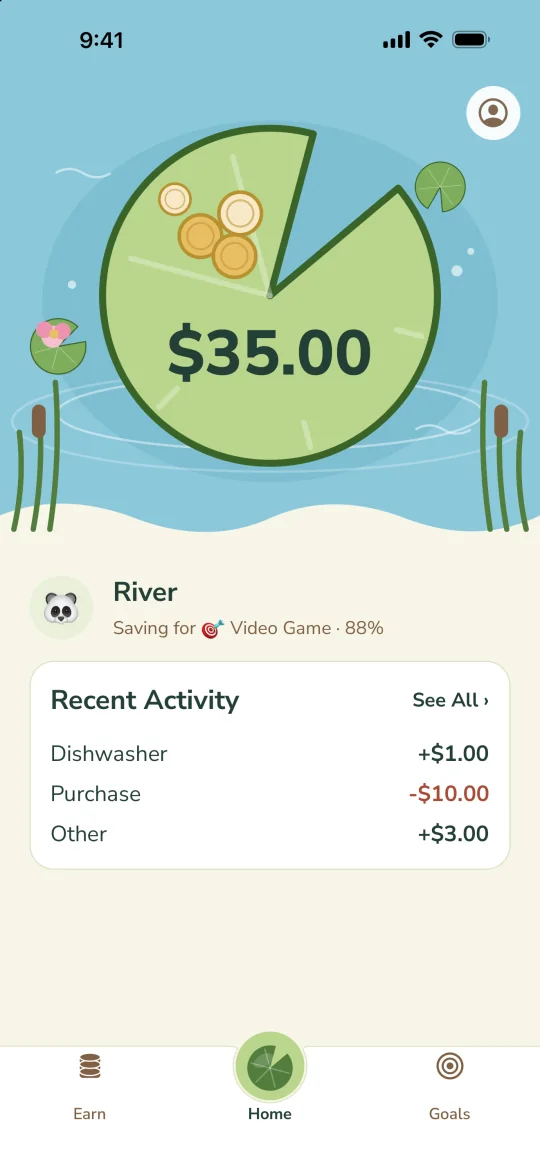
The first thing a child sees is their balance, floating on a lily pad in their own pond. Below it are the goal they’re saving for and their recent activity. There are no menus to dig through, and it’s simple enough for early readers.
Their own login, with no email or password
Kids can use “View as a Child” on your device, or they can have their own login on their own phone or tablet. You get a one-time code from their settings, they tap “I’m a Kid” and enter it, and they’re connected. They don’t need an email address or a password, and they see only their own Pond, chores, and activity, never a brother’s or sister’s.
Goals they can see filling up
Saving is easier to understand when you can see it. Kids pick something to save for, choose a picture for it, and watch a progress bar fill as their balance grows. No reading is required to see how close they are, and that visual progress can be a real motivator.
Chores they can take on themselves
Kids can see their chores, mark them done, and pick up available chores on their own. You approve the work before it’s added to their balance. They get to take the initiative, and you stay in charge.
Why this independence matters
When children can check their own money, it becomes theirs. They start making their own decisions: is this worth buying now, or should I keep saving? That habit of looking, planning, and choosing is the real lesson, and they get to practice it long before they ever have a real bank account.
What kids learn from a virtual allowance
A virtual balance teaches many of the same lessons as real money, with much lower stakes:
- Earning: money comes from effort, whether that’s chores, allowance, or good choices.
- Saving: waiting for something bigger takes patience, and a savings goal makes the wait visible.
- Spending: when you buy something, the balance goes down, and the activity list shows it.
It’s a safe place to practice with money before it’s real.
How to get started with FroggyFunds
- Download FroggyFunds on iPhone, iPad, Android, or a Fire tablet, and create a parent account.
- Add your kids. You can use your own currency or play money like lily pads.
- Add what they already have, post chores, or set a weekly, biweekly, or monthly allowance.
- Let them see it, on your device or their own.
FroggyFunds is free for 1 child and 1 parent, with the balance and activity. A one-time $19.99 US unlock adds chores, allowance, savings goals, and up to 8 children, with no subscription.
Common questions
Is FroggyFunds a kids debit card?
No. FroggyFunds is a virtual allowance tracker. There is no card, no bank account, and no real money in the app. You keep the real money and FroggyFunds keeps the record.
Does my child need their own phone?
No. Your child can use “View as a Child” on your device, or connect their own phone or tablet with a one-time code. They don’t need an email or password.
Can I use it as a reward system for a child with autism?
Our family does. You can add a small amount to a child’s balance whenever you want to reward something, and they can see it right away. FroggyFunds is not a medical or therapy product, so if your child works with a therapist, ask how it might fit with what they already do.
Is FroggyFunds free?
It’s free for 1 child and 1 parent, with the balance and activity. A one-time $19.99 US unlock adds chores, allowance, savings goals, up to 8 children, and up to 4 co-parents. There is no subscription.
Small hops count.